
Agilent 6890 FID Troubleshooting: Why the Flame Will Not Light or Stay Lit
5th Oct 2026
Agilent 6890 FID Troubleshooting: Flame, Flow, Baseline and Sensitivity Problems
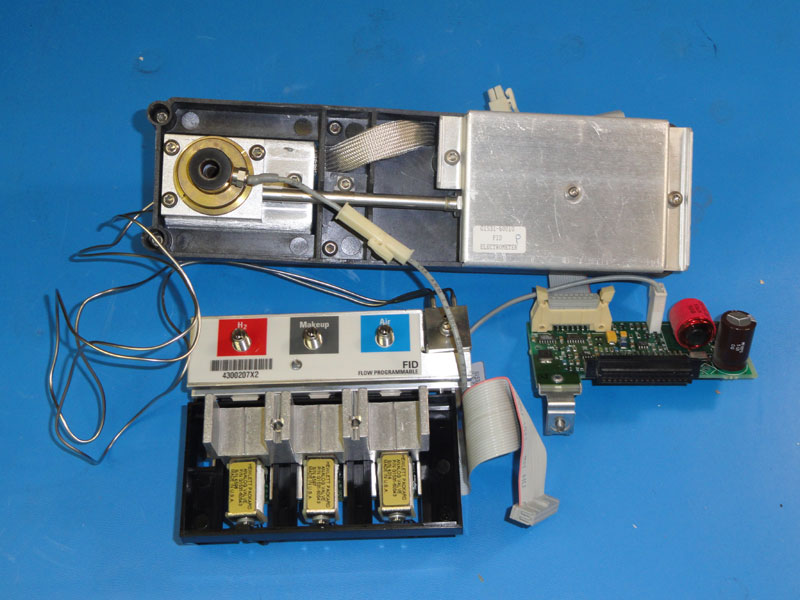
- Confirm hydrogen, air, carrier and makeup-gas supply.
- Verify actual detector gas flows rather than relying only on displayed values.
- Check for gas leaks.
- Inspect the FID jet for restriction or contamination.
- Verify column installation and detector connection.
- Confirm the igniter functions correctly.
- Inspect and clean the detector collector and insulators if response remains poor.
- Investigate EPC or detector electronics only after basic gas-flow and maintenance issues have been eliminated.
Many apparent “detector failures” are actually caused by flow restrictions, leaks, dirty detector components, incorrect column installation or contaminated gas paths.
Key Takeaways
- An Agilent 6890 FID requires the correct balance of hydrogen, air and carrier/makeup flow to ignite and remain stable.
- Agilent recommends measuring actual FID flows during troubleshooting because displayed EPC values may not reveal restrictions or leaks.
- A partially plugged FID jet can cause ignition problems, low response and abnormal gas flow.
- A leaking column fitting or detector fitting can create symptoms that look like an FID hardware failure.
- High background or noise can result from contamination of the jet, collector, detector body, gas supply or analytical column.
- If the flame lights but the chromatographic response is weak, do not immediately assume the flame is the problem.
- Change one variable at a time so the actual cause of the failure can be identified.
- Hydrogen is flammable. Never bypass detector safety logic or repeatedly attempt ignition when gas or leak status is uncertain.
Understanding the Agilent 6890 Flame Ionization Detector
The Flame Ionization Detector, or FID, is one of the most widely used detectors in gas chromatography.
It is particularly useful for detecting carbon-containing organic compounds including:
- hydrocarbons
- solvents
- volatile organic compounds
- petroleum products
- fatty acids
- many pharmaceutical and chemical compounds
Inside the detector, compounds exiting the GC column enter a hydrogen-air flame.
Combustion of many organic compounds produces ions. The detector measures this ion current and converts it into a chromatographic signal.
A stable FID therefore depends on several systems working together:
- carrier gas
- makeup gas
- hydrogen fuel
- air
- the FID jet
- collector assembly
- igniter
- electrometer electronics
- proper column installation
When any one of these is incorrect, the symptom may appear at the detector even though the detector itself is not defective.
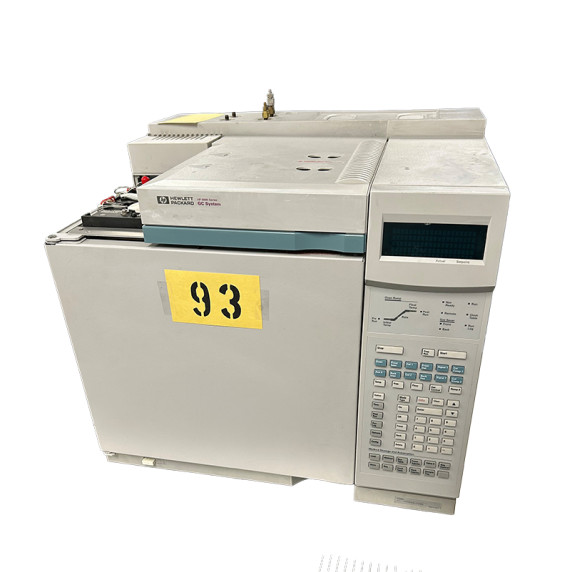
Current Agilent 6890 GC-FID at HiTechTrader
HiTechTrader currently carries an:
Agilent Networked 6890 GC with FID and ChemStation A10 Computer .
The current system includes:
- Agilent Networked 6890 GC
- Flame Ionization Detector
- Electronic Pneumatic Control
- computer workstation
- ChemStation A10 software
Agilent 6890 FID Troubleshooting by Symptom
| Symptom | Check First |
|---|---|
| FID will not ignite | Hydrogen supply, air supply, actual gas flow, igniter, jet restriction, gas leaks. |
| FID lights and immediately goes out | Hydrogen/air balance, actual detector flow, jet condition, leaks, column installation. |
| FID flame is lit but no peaks appear | Column flow, detector signal, column connection, injection, electrometer, method configuration. |
| Very low sensitivity | Dirty jet, detector contamination, gas purity, incorrect flow, inlet contamination, injection problems. |
| Noisy baseline | Contaminated detector, gas contamination, column bleed, dirty inlet, leaks, electrical grounding. |
| Baseline slowly drifts upward | Column bleed, contamination, detector temperature, oven program, recent maintenance. |
| Baseline spikes | Electrical noise, contamination, intermittent gas flow, loose connections, septum or inlet contamination. |
| FID repeatedly shuts down | Gas-flow setpoint failure, insufficient supply pressure, leak, EPC problem or detector safety shutdown. |
| Retention times also change | Carrier-gas flow, inlet leak, column connection or EPC rather than FID alone. |
1. Confirm the Gas Supply Before Touching the Detector
The first troubleshooting step should be confirming that the detector actually has the gases it requires.
Check:
- hydrogen supply or hydrogen generator
- air supply
- carrier-gas supply
- makeup-gas supply if used
- cylinder pressure
- regulator pressure
- shutoff valves
- gas-line connections
- gas purity
A cylinder can still contain gas while the pressure delivered to the GC is too low for stable operation.
Likewise, a regulator or restriction upstream from the GC can prevent the detector from reaching its requested flow even when the supply cylinder appears normal.
2. Verify Actual FID Gas Flow
One of the most important recommendations in Agilent's 6890 troubleshooting guidance is to verify the actual detector gas flow.
Do not assume the gas flow is correct solely because the front panel displays the desired value.
Why?
The Electronic Pneumatic Control system calculates flow based on pressure and calibrated restrictions. A leak or blockage downstream from the flow control system can cause actual flow to differ from what is expected.
Agilent's historical guidance for a common 6890 FID configuration identifies approximately:
- Air: 400 mL/min
- Carrier + makeup for capillary operation: approximately 30 mL/min
- Hydrogen: equal to or greater than total carrier/makeup flow for the referenced configuration
These are troubleshooting reference values, not universal method settings.
Always use the values specified for the exact detector configuration, column and method.
3. Check for a Gas Leak
Leaks are one of the most common causes of confusing GC problems.
Possible leak locations include:
- column fitting at the FID
- column fitting at the inlet
- ferrules
- detector fittings
- gas-line fittings
- inlet seals
- detector seals
A detector leak can reduce the actual gas flow reaching the flame.
An inlet leak can also alter carrier flow and chromatographic performance, making the problem appear to originate at the FID.
Use an approved electronic leak detector or the leak-check procedure specified by Agilent.
Avoid using methods or chemicals that could contaminate analytical gas lines or detector components.
4. Inspect the FID Jet
The FID jet is one of the first physical components to inspect when:
- the flame is difficult to ignite
- actual hydrogen flow appears abnormal
- sensitivity is low
- the detector has processed dirty samples
- the detector has not been maintained recently
Material can accumulate inside or around the jet because of:
- sample contamination
- column bleed
- septum particles
- dirty inlet components
- high boiling residues
A partially restricted jet changes the gas-flow characteristics inside the detector.
That can make ignition difficult even though the EPC system appears to be supplying gas.
Do not mechanically enlarge the jet
Follow Agilent's specified cleaning or replacement procedure.
Forcing an oversized wire or tool through the opening can damage the jet geometry and permanently alter detector behavior.
5. Make Sure the Correct FID Jet Is Installed
Agilent produced different FID jet configurations for different column and detector applications.
If a detector was recently rebuilt or the jet was replaced, verify that the installed part is correct for the GC configuration.
An incorrect jet can produce abnormal flow or poor analytical performance even if the component physically fits the detector.
6. Verify the Column Installation
If the FID problem appeared immediately after:
- changing a column
- trimming a column
- replacing a ferrule
- performing detector maintenance
inspect the column connection before changing anything else.
Potential problems include:
- incorrect insertion depth
- poor ferrule seal
- cracked column
- column not fully connected
- excessive column insertion
An improperly installed column can create a leak or interfere with proper flow into the detector.
7. Confirm the FID Igniter Is Working
During the ignition sequence, the igniter should become hot enough to ignite the hydrogen-air mixture.
If the correct gas flow is present but the flame does not ignite, confirm that the igniter is functioning according to the Agilent diagnostic procedure.
Do not immediately replace the igniter before checking gas flow.
A perfectly functional igniter cannot light a detector that is not receiving the proper hydrogen and air mixture.
8. How to Tell Whether the FID Flame Is Actually Lit
A common troubleshooting mistake is assuming that the detector successfully ignited just because the GC completed its ignition sequence.
Verify flame status using the instrument's detector status and the procedure specified in the Agilent manual.
Agilent documentation also describes checking for water vapor produced by combustion as one physical confirmation method.
If the software or front panel reports repeated flame out events, focus on gas flow and flame stability.
9. FID Lights but Immediately Goes Out
A flame that ignites but does not remain lit usually points toward a different set of problems than a detector that never ignites.
Check:
- hydrogen flow
- air flow
- makeup-gas flow
- actual versus displayed flow
- jet restriction
- gas leaks
- column fitting
- supply pressure
A partially plugged jet can sometimes allow enough gas through for temporary ignition but not enough for stable operation.
10. FID Is Lit but There Are No Peaks
If the flame is clearly lit but the chromatogram contains no expected peaks, the problem may no longer be an ignition problem.
Work backward through the analytical path.
Check the injection
For manual injection:
- confirm syringe operation
- verify injection technique
- confirm sample concentration
For autosamplers:
- confirm the vial was actually injected
- check syringe position
- inspect the autosampler syringe
Check the inlet
Possible inlet issues include:
- blocked liner
- leaking septum
- contaminated liner
- wrong split ratio
- incorrect inlet temperature
Check the column
Verify that carrier gas is actually passing through the column and into the FID.
If the column is broken inside the oven or disconnected at one end, the detector can remain lit while receiving no analyte.
Check the signal
Confirm that:
- the detector signal is enabled
- the correct detector channel is being acquired
- ChemStation is configured for the correct signal
11. Low FID Sensitivity
Low sensitivity means peaks appear, but response is substantially weaker than expected.
Possible causes include:
- partially restricted FID jet
- dirty collector
- contaminated detector body
- incorrect gas flow
- poor gas purity
- inlet discrimination
- sample loss
- column problems
- incorrect detector configuration
Compare a known standard
Before disassembling the GC, inject a known reference standard if your laboratory procedure permits.
If response to the standard is normal, the problem may be related to:
- sample preparation
- sample degradation
- concentration
- injection technique
If the standard is also weak, continue troubleshooting the instrument.
12. High FID Background
An elevated baseline often indicates contamination somewhere in the analytical path.
Possible sources include:
- dirty FID jet
- dirty collector
- contaminated gases
- column bleed
- dirty inlet liner
- septum bleed
- contaminated sample path
The baseline pattern can help identify the cause.
For example, if background rises strongly as oven temperature increases, column bleed becomes an important possibility.
13. Noisy FID Baseline
Baseline noise can originate from both chemical and electrical sources.
Check:
- detector contamination
- gas purity
- flow stability
- column condition
- inlet contamination
- electrical connections
- grounding
Agilent's FID noise troubleshooting guidance specifically recommends cleaning or replacing contaminated detector components after flow problems have been eliminated.
14. Clean the FID Collector and Insulators
If gas flow, jet condition and column installation are correct but baseline performance remains poor, detector contamination may be the problem.
Components that may require inspection include:
- collector
- Teflon insulators
- jet
- detector body
- castle assembly
Deposits on insulating surfaces can affect electrical performance and contribute to an unstable or elevated signal.
Use the Agilent cleaning procedure for the exact detector configuration rather than generic solvent-cleaning methods.
15. Watch for Column Bleed
Column bleed occurs when stationary-phase material gradually leaves the analytical column, particularly at elevated oven temperatures.
Signs can include:
- baseline increasing during a temperature program
- higher detector background at high oven temperature
- increasing contamination at the FID
Excessive column bleed can result from:
- column aging
- oxygen exposure at high temperature
- operating beyond the recommended temperature
- contamination
16. Inlet Contamination Can Look Like an FID Problem
The detector receives everything that successfully travels through the inlet and column.
Contamination originating upstream can therefore appear as:
- baseline instability
- ghost peaks
- poor sensitivity
- tailing
- carryover
Check:
- septum
- liner
- gold seal
- inlet body
- column head
before assuming the detector is responsible.
17. FID Temperature Problems
The FID must remain hot enough to prevent analytes and high boiling compounds from condensing inside the detector.
Agilent's 6890 troubleshooting guidance historically recommends maintaining the FID temperature above the final oven temperature used in the method, with approximately 300°C cited as a typical operating value in its ignition troubleshooting document.
The correct temperature depends on:
- method
- column
- analytes
- detector configuration
Use the method and instrument manual rather than automatically changing the detector to 300°C.
18. Check Gas Purity
Gas purity affects both detector performance and column life.
Contamination from:
- oxygen
- water
- hydrocarbons
can contribute to background, instability and column degradation.
If problems began immediately after:
- changing a gas cylinder
- replacing a regulator
- opening a gas line
- changing a purifier
investigate the gas supply before disassembling the detector.
19. What If the GC Cannot Reach the Requested Flow?
If the Agilent 6890 reports that a detector gas cannot reach its setpoint, check:
- supply pressure
- regulator setting
- gas-line restriction
- leaks
- FID jet restriction
- detector pneumatic connections
Only after those possibilities are eliminated should an EPC module problem move higher on the list.
20. When to Suspect the EPC Module
Electronic Pneumatic Control problems are possible, but they should generally not be the first assumption.
Suspect an EPC or pneumatic control problem when:
- supply pressure is correct
- there are no leaks
- the jet and detector flow path are clear
- actual gas flow remains significantly different from expected flow
- flow control is unstable across multiple tests
At this stage, trained service diagnosis is usually more appropriate than continued parts swapping.
21. When to Suspect Detector Electronics
If the flame is stable but detector signal remains absent or abnormal after the mechanical and gas systems are confirmed, investigate:
- electrometer
- collector connection
- signal cable
- detector electronics
- data system configuration
A stable flame with no measurable signal points toward a different diagnostic path than a detector that cannot stay lit.
Best Troubleshooting Order
The fastest troubleshooting process moves from simple external causes toward more complex internal ones.
| Step | Check | Why |
|---|---|---|
| 1 | Gas supply | Simple supply problems can mimic detector failure. |
| 2 | Actual gas flow | Displayed flow does not always reveal leaks or restrictions. |
| 3 | Leak integrity | Leaks change flame conditions and chromatographic flow. |
| 4 | FID jet | Restriction can cause ignition and sensitivity problems. |
| 5 | Column installation | A recent column change is a common source of new problems. |
| 6 | Igniter | Verify the ignition system only after proper gas flow is confirmed. |
| 7 | Collector / detector contamination | Important for noise and sensitivity problems. |
| 8 | Inlet and column contamination | Upstream problems often appear at the detector. |
| 9 | EPC / electronics | Investigate after simpler causes have been eliminated. |
Do Not Change Everything at Once
One of the easiest ways to make troubleshooting harder is to:
- replace the jet
- change gas pressure
- trim the column
- replace the septum
- change detector temperature
- edit the method
all at the same time.
The detector may start working again, but you will not know what actually fixed it.
Instead:
- record the original conditions
- change one variable
- test the result
- document what happened
This produces a much more useful maintenance history.
Agilent 6890 Preventive FID Maintenance
Many FID problems can be prevented with routine maintenance.
A practical maintenance program may include:
- Replace inlet septa before excessive coring or contamination develops.
- Inspect and replace inlet liners as needed.
- Inspect the FID jet periodically.
- Clean the collector and detector components when required.
- Check gas purifiers.
- Leak check the instrument after column or inlet maintenance.
- Track baseline noise and sensitivity over time.
- Replace aging columns when bleed becomes excessive.
- Verify gas pressure after changing cylinders.
- Document maintenance in the instrument log.
Should You Repair or Replace an Older Agilent 6890?
The 6890 remains a highly capable GC, so one FID maintenance problem does not automatically justify replacing the system.
Repair usually makes sense when:
- the detector simply needs cleaning
- the FID jet needs replacement
- the column or ferrule is leaking
- the igniter has failed
- routine inlet maintenance is overdue
Replacement becomes more attractive when:
- multiple instrument modules are failing
- the GC has repeated EPC problems
- the workstation is unreliable
- software compatibility has become difficult
- downtime is interrupting production
- your laboratory needs a different detector configuration
- you now need automation or GC-MS capability
If replacement is being considered, read:
Agilent 6890 vs 7890 GC: Which Gas Chromatograph Is Right for Your Lab? .
Replacement Agilent GC Options
HiTechTrader currently offers:
- Agilent Networked 6890 GC with FID and ChemStation
- Agilent 6890 / 5975 GC-MS with FID and G4515A Autosampler
- Current Gas Chromatographs
- Current Agilent Laboratory Equipment
Frequently Asked Questions
Why won't my Agilent 6890 FID light?
Common causes include insufficient hydrogen or air supply, incorrect detector flow, a gas leak, restricted FID jet or failed igniter. Verify gas delivery and actual flow before replacing detector hardware.
Why does my Agilent 6890 FID light and then go out?
A flame that ignites but immediately extinguishes often indicates an unstable gas mixture, inadequate supply pressure, leak or partially restricted jet.
How do I know whether my Agilent 6890 FID flame is lit?
Use the detector status and flame verification procedures described in the Agilent 6890 troubleshooting manual. Do not rely solely on hearing the ignition sequence.
What causes a clogged FID jet?
Sample residue, column bleed, septum particles and contamination from the inlet or analytical flow path can gradually restrict the jet.
Can a clogged FID jet cause low sensitivity?
Yes. A partially restricted jet can alter detector gas flow and reduce analytical response.
Can a dirty FID cause a noisy baseline?
Yes. Contamination on the collector, insulators, jet or detector body can contribute to elevated background and noise.
Why does my FID show a high baseline?
Common causes include detector contamination, dirty carrier gas, column bleed, inlet contamination or inappropriate detector conditions.
Why does the FID baseline rise as the GC oven heats?
A baseline that rises with oven temperature can indicate column bleed, especially when the column is old, contaminated or operated near its upper temperature limit.
What causes FID baseline spikes?
Potential causes include intermittent contamination, electrical noise, unstable gas flow, loose connections, septum particles or sample carryover.
Can the GC column cause an FID ignition problem?
Yes. Improper column installation or a leak at the detector fitting can affect detector flow and flame stability.
Can the inlet cause low FID response?
Yes. A dirty liner, leaking septum, incorrect split ratio, injector contamination or poor injection technique can reduce the amount of analyte reaching the detector.
What FID gas flow should an Agilent 6890 use?
The exact flows depend on the detector and method configuration. Agilent's historical 6890 troubleshooting guidance lists approximately 400 mL/min air and around 30 mL/min total carrier plus makeup flow for one common capillary FID configuration. Always verify your exact configuration in the instrument manual.
What temperature should an Agilent 6890 FID be?
Detector temperature should be appropriate for the analytical method and high enough to prevent sample condensation. Agilent's historical troubleshooting guidance notes keeping the FID above the final oven temperature, with approximately 300°C cited as a common operating temperature. Follow the method and instrument documentation for the exact application.
How do I know if the FID EPC is bad?
An EPC problem becomes more likely after correct supply pressure, leak integrity, jet condition and gas-path restrictions have been ruled out but actual detector flow still cannot be controlled correctly.
Is the Agilent 6890 still worth repairing?
Often, yes. The 6890 remains useful for many routine GC and GC-FID applications. Repair economics depend on the number of failed components, software condition, downtime requirements and the availability of suitable replacement systems.
Can I replace an old Agilent 6890 with another used 6890?
Yes. For laboratories with validated methods, trained staff and existing 6890 workflows, replacing a failed unit with a tested used 6890 can minimize method-transfer and retraining work.
Technical References
- Agilent — 6890N Gas Chromatograph User and Troubleshooting Guide
- Agilent — 6850/6890 FID Ignition Problems
- Agilent — Troubleshooting Noise and High Background on 6890/6850 FID
Exact detector gas flows, pressures, jet types, temperatures and maintenance procedures depend on the individual 6890 configuration. Verify the instrument serial/configuration and follow the appropriate Agilent service or operating documentation.
Related HiTechTrader Guides
Is Your Agilent 6890 Down?
If routine detector maintenance is no longer solving the problem or the GC has multiple aging components, HiTechTrader can help you compare repair versus replacement options.
Send us:
- your Agilent GC model
- detector configuration
- inlet configuration
- current error or symptom
- autosampler model if applicable
- software / ChemStation version
- whether your existing method must remain on the 6890 platform
We can help identify a suitable replacement GC, FID-equipped system or complete GC-MS configuration from available inventory.
Contact HiTechTrader About Agilent GC Equipment
Or browse: current GC inventory .